

A digital asset management audit reviews every asset in your library for accuracy, relevance and usage rights, then removes, archives or withdraws what no longer earns its place. Run a short check-up twice a year on a library already in a DAM, and a full ten-step audit before any migration to a new platform.
Why Auditing and Prioritising Your Digital Assets is a Marketing Must-Have
For over two decades, I've championed the power of marketing technology, including Digital Asset Management (DAM) software. I've been responsible for implementing martech across numerous organisations, as well as marketing solutions to brands and creative teams across the globe. But even the most seasoned professional can fall victim to disorganisation. Recently, in a last-minute, frantic search for a selection of logos and graphics to include in a campaign, I unearthed a treasure trove of outdated assets. It was a reminder that even marketers with the best intentions can struggle to keep their DAM libraries in tip-top shape.
The truth is, neglecting our digital assets and not running regular digital asset management audits can have serious consequences. Our ever-growing to-do lists often leave DAM audits on the back burner. Metadata becomes outdated, valuable assets get lost, and content creators end up recreating what already exists. This is a marketer's nightmare – wasted time, wasted resources and missed opportunities.
The Power of a DAM Audit: Unlocking Efficiency and Effectiveness
By investing time in a DAM audit, you're not just decluttering your digital space – you're unlocking the full potential of your marketing software. So let's look at what's involved in undertaking a regular audit. Simple Asset Manager is a digital asset management platform that centralises your entire asset library with version control, download history and metadata management built in – which means much of the audit data described below is already at your fingertips.
For a library already in a DAM, a regular check-up takes four steps:
Step 1: Embrace the Data
Your digital asset management software is a goldmine of information, not just a storage locker. Use its data – download statistics, usage data, creation dates and expiry dates – to identify forgotten gems and under-utilised content.
Step 2: The Metadata Makeover
Accurate, up-to-date metadata is the key to findability. Give your assets a metadata makeover so it reflects current industry terms and best practice. It's a little like SEO: keywords and the terms we use change over time, trends come and go, and it's important to review our data so it stays current and assets can be found on demand.
Step 3: The Ruthless Review
Be ruthless! Identify outdated content, especially for discontinued products or services. Don't just delete it – consider archiving it for historical purposes (but keep it out of the way). Anything past its usage rights should be withdrawn, not just archived.
Step 4: The Fresh Start
Develop a regular audit schedule. Start with twice-yearly check-ins and adjust the frequency as needed.
Bonus Tip: Collaboration is KeyDon't go it alone! Involve your marketing, brand and product teams, especially those responsible for content creation. Collaborative audits ensure everyone is on the same page and using the right assets. |
Beyond the Basics: A Deep Dive into DAM Optimisation
Now that we've covered the fundamentals, let's look at the strategic benefits of auditing and prioritising your digital assets.
Extends the Lifespan of Digital Assets
A disorganised DAM diminishes the value of your content. Just like forgotten vegetables in the back of the fridge, valuable assets get lost and under-utilised. Regular audits help you find these forgotten gems, saving you the cost of recreating content or creating new assets when you could repurpose the ones you have.
Makes Migrations Efficient
Planning to migrate your assets to a new DAM platform? Auditing and prioritising beforehand is crucial. Migrating a disorganised library wastes time and money, and there is no point migrating assets that are no longer current or are past their usage rights. Cleaning up your library allows for a smoother transition, reduces migration costs and gets users started on the right foot.
Provides Insights into Dynamic Content
Imagine a pantry so messy you can't tell what you have or what you need. The same goes for a disorganised asset library. Proactive content creation requires knowing what exists and what gaps need to be filled. Audits give you a clear picture of your content library, empowering your brand, marketing, creative and sales teams to find or create what they need.
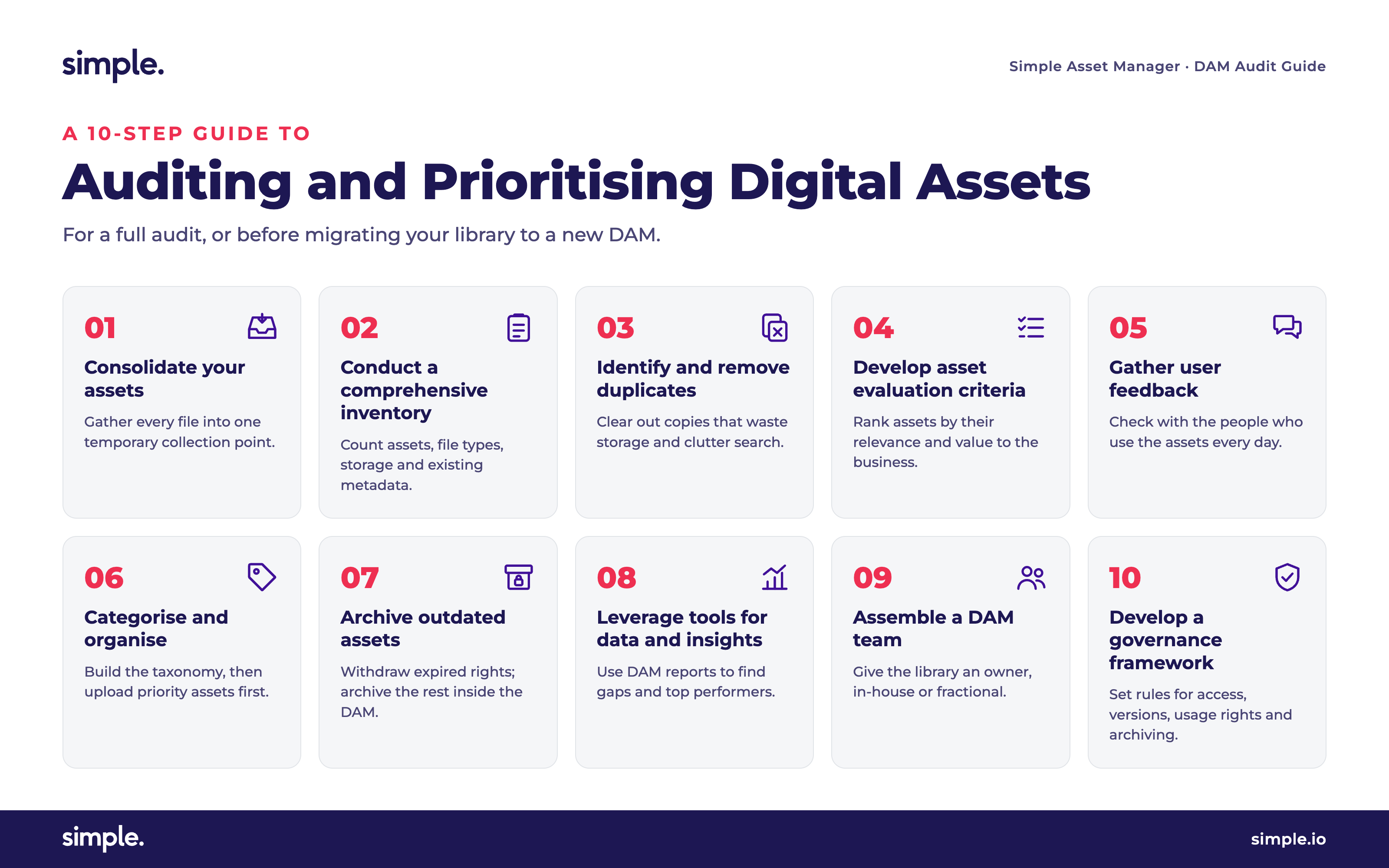
A 10-Step Guide to a Full Audit or Migration
Step 1: Consolidate Your Assets
The first step is gathering all your creative content into one place – from personal hard drives, company servers, shared drives, cloud storage folders and any existing DAM platforms. Set a deadline and a single submission point so agencies and other teams hand everything over, and nothing stays stranded in an inbox. Treat this collection point as temporary: the goal is to sort, clean and prioritise the library before it goes into the DAM you'll govern it from, not to swap one shared folder for another.
Step 2: Conduct a Comprehensive Inventory
Once your assets are in one place, you need some basic insights. How many assets do you have? Which file types dominate the library? How much storage does it use, what is the average file size, and how much existing metadata survives? A spreadsheet is enough to compile this for a migration; if you already run a DAM, use its built-in reports. These numbers set the effort for every step that follows.
Step 3: Identify and Remove Duplicates
Duplicate files are the bane of any DAM program. They waste storage space and clutter your library. Use your DAM platform's upload tools and de-duplication tools to identify and remove them. With version control, templating and permissions in your DAM platform, you can remove duplicates with confidence.
Step 4: Develop Asset Evaluation Criteria
Next, prioritise your assets based on their relevance and value to your organisation. This will vary depending on your needs. Create custom evaluation criteria to prioritise content and understand its value.
Step 5: Gather User Feedback
Once you've identified a priority set of assets, make sure nothing crucial is missing. Get feedback from end users, particularly social media managers and content creators. They may hold essential assets that weren't included in your initial evaluation. Listen to their feedback, but don't let it balloon the priority list.
Step 6: Categorise and Organise
Now comes the clean-up phase. If you're moving to a new DAM, build your metadata taxonomy first, then upload priority assets with full metadata – bulk upload and bulk metadata application mean you don't have to tag file by file. Lower-priority assets can follow with lighter tagging. Make sure file names and metadata are consistent and documented before anything goes in. If you already run a DAM, this step means reorganising assets into collections and saved searches, updating the taxonomy, and applying metadata in bulk to close the gaps.
Step 7: Archive Outdated Assets
The lowest-priority assets are usually outdated, off-brand or past their usage rights. Treat these differently. Assets with expired rights should be withdrawn so they can't be downloaded or reused – not simply moved to another folder – with the licence record kept in case you're ever asked how the asset was used. Outdated assets that are still cleared for use but hold historical value can sit in a restricted archive collection within the DAM, out of everyday search but available to the people who occasionally need them. Review the archive regularly and delete anything with no further value.
Step 8: Leverage Tools for Data and Insights
With the heavy lifting done, turn your focus to the future. Where are the gaps in your content library? What types of assets drive success? Use DAM platform reports to gain insights into asset usage patterns, performance and user behaviour. Consider working with external agencies to evaluate asset performance on your website, e-commerce platform, marketing campaigns and social media. These insights will guide your future asset creation and optimisation.
Step 9: Assemble a DAM Team
Maintaining a clean and organised DAM program requires ongoing effort. Ideally, a dedicated DAM team looks after program organisation, priority asset availability, communication of data and insights, and user education. For organisations without the resources for a full-time DAM team, a fractional approach works well – engaging external DAM librarians, managers or strategists part-time to establish metadata standards and conduct regular audits.
Step 10: Develop a Governance Framework
Just like a fridge needs regular cleaning, so does your DAM. Set out a governance framework with policies and procedures for every stage of an asset's lifecycle: access permissions, version control, usage rights and licence expiry, and archiving or deletion. Schedule the next audit before you close this one.
By following these steps and embracing a DAM audit culture, you can transform your DAM from a cluttered graveyard into a well-organised content library that empowers your marketing efforts. Imagine the time saved, the resources freed up, and the creative possibilities unleashed with a DAM finally working for you.
Ready to unlock the marketing superpower of a clean and efficient DAM? Watch a Demo or Book a Demo to see how Simple Asset Manager makes auditing part of your everyday workflow.
Frequently Asked Questions
How do you audit a digital asset library?
Start with the data your DAM platform already holds: download statistics, usage data, creation dates and expiry dates reveal which assets are used, forgotten or expired. Then review and update metadata so assets remain findable, remove or archive outdated content, de-duplicate the library, and prioritise remaining assets against evaluation criteria that reflect their value to your organisation. Finish by setting a recurring audit schedule and a governance framework covering access control, version control, usage rights and archiving, so the library stays clean between audits.
How often should you audit your digital asset management system?
Twice-yearly check-ins are a good starting point for most marketing teams, adjusted to suit your asset volume and campaign cadence. High-volume libraries with frequent campaign turnover benefit from quarterly reviews, while smaller, stable libraries may only need a thorough annual audit. The frequency matters less than the consistency: a regular schedule prevents the metadata decay, duplicate build-up and outdated content that make one-off clean-ups so painful.
How do you prepare and migrate existing assets to a new digital asset management platform?
Audit before you migrate. Gather assets from every current location into one temporary collection point, run a full inventory, remove duplicates and prioritise what is worth moving, since there is no point migrating assets that are outdated or past their usage rights. Then build the metadata taxonomy for the new digital asset management platform and bulk upload priority assets with full metadata first, with lower-priority assets following on lighter tagging. Withdraw anything with expired rights, and keep cleared historical assets in a restricted archive collection rather than in uncontrolled storage.


