

Most marketing teams don't go shopping for a software category. They go shopping because something is broken: approvals stall, the wrong logo keeps turning up, or nobody can say who signed off a regulated ad. The trouble is that vendors describe the same capability with different labels, and the categories overlap.

This guide sorts marketing operations software by the problem each category solves. For each one it covers the signs you need it, the signs you don't need it yet, and what it's commonly confused with. It then compares the categories that overlap most, suggests a buying order for common situations, and gives you the questions to ask vendors before you commit.
Which type of marketing software do you need?
Start with the problem you feel most often, then read across.
| If your biggest problem is… | You probably need | What it's built to do |
|---|---|---|
| Nobody can see who's working on what, when work is due, or whether the team has capacity | Marketing project management software | Briefs, projects, tasks, owners, deadlines and workload |
| Reviews are slow, feedback is scattered across email and chat, and approvals stall | Approval workflow and online proofing software | Review stages, online markup, version comparison and approvals |
| Higher-risk content goes out without the right checks, mandatory wording is missed, or you can't prove who approved what | Marketing compliance software, often part of approval workflow software | Mandatory review stages, reviewer checklists, approved wording and a complete audit trail |
| People can't find current assets, or old versions keep being used | Digital asset management (DAM) | Storing, searching, controlling and sharing finished assets |
| Teams and agencies apply the brand inconsistently | Brand management software | Brand guidelines, templates and approved brand elements in one place |
| Product details differ across your website, catalogues and marketplaces | Product information management (PIM) | One accurate record for every product, used in every channel |
| You need to plan budgets, people and campaigns across the whole marketing function | Marketing resource management (MRM) | Planning, budgets and spend, alongside work and assets |
Most teams recognise themselves in more than one row. That's normal. The sections below help you work out which problem to solve first.
The seven categories, and how to tell if you need each one
Marketing Project Management Software
Marketing project management software organises the work itself: briefs, projects, tasks, owners and deadlines, with a view of each person's workload. Unlike general-purpose task tools, it is built around how marketing work moves: from a brief, through production and review, to a finished deliverable.
Signs you need it:
- Requests arrive by email, chat and hallway conversation, and some get lost.
- You can't answer "what's the status of that job?" without asking someone.
- People are overloaded while others have capacity, and you only find out when a deadline slips.
You may not need it yet if your team is small, handles a few jobs a week and the bottleneck is review rather than production. In that case, start with approval workflow software that includes basic project tracking.
Often confused with: marketing resource management. Project management manages the work and the people doing it; MRM adds planning and financial control across the whole function. Read the complete guide to marketing project management software, or see marketing project management with Simple.
Approval Workflow and Online Proofing Software
Approval workflow software routes each piece of content through set review stages, so the right people see it in the right order. Online proofing lets reviewers mark up the file directly and compare versions, instead of sending comments by email.
Signs you need it:
- Feedback arrives in five places and sometimes contradicts itself.
- Reviewers comment on an old version because they didn't know a new one existed.
- Jobs sit waiting for one approver, and nobody notices until the deadline.
You may not need it yet if one person approves everything and reviews rarely go past one round. Once a second reviewer or a second round becomes normal, email stops scaling.
Often confused with: marketing compliance software. Approval workflow gets content reviewed; compliance controls make sure the right reviews can't be skipped and can be proven later. Read the complete guides to marketing approval workflow and online proofing software, or see Simple's approval workflow and online proofing solutions.
Marketing Compliance Software
Marketing compliance software adds controls to the approval process: mandatory review stages, reviewer checklists, approved wording and a complete audit trail of who approved what and when. It is rarely a standalone category. In practice it is usually a set of features inside approval workflow software.
Signs you need it:
- You work in a regulated industry such as banking, insurance or health, and legal or compliance must sign off certain content.
- Answering an audit or regulator request means searching inboxes for approvals.
- Mandatory disclaimers or product wording have been missed or used in an outdated form.
You may not need it yet if none of your content carries regulatory, legal or financial risk. Standard approval workflow will usually be enough.
Often confused with: a separate product. For most teams, compliance is a requirement to check inside the approval tool, not a second system to buy. Read the complete guide to marketing compliance, or see marketing compliance with Simple.
Digital Asset Management (DAM)
Digital asset management software stores finished assets such as images, video, logos and artwork in one searchable library, with controls over who can use what and which version is current.
Signs you need it:
- People spend real time hunting for files across drives, inboxes and agency folders.
- Outdated logos, expired images or superseded artwork keep reappearing.
- Re-running a campaign means rebuilding it because nobody can find the final files.
You may not need it yet if your asset volume is small and one team creates and uses everything. A lightweight asset library inside your project or approval tool may cover it for now.
Often confused with: approval workflow and PIM. DAM manages assets after they're approved; it doesn't manage the work or the reviews that create them. And it manages media files, not product data. Read the complete guide to DAM software, or see digital asset management with Simple.
Brand Management Software
Brand management software keeps brand guidelines, templates and approved brand elements in one place, so internal teams, franchisees and agencies apply the brand consistently.
Signs you need it:
- Many people outside the core marketing team create content: sales, regional offices, franchisees or agencies.
- Your brand guidelines live in a PDF that nobody opens.
- Simple requests for a flyer or social tile queue up behind the design team.
You may not need it yet if a small central team produces almost everything. Guidelines plus a well-organised asset library may be enough.
Often confused with: DAM. DAM stores the assets; brand management governs how the brand is applied and lets non-designers produce on-brand material. Read how to keep your brand consistent across teams, or see brand management with Simple.
Product Information Management (PIM)
Product information management software holds one accurate record for every product, including descriptions, specifications, pricing and images, and feeds it to your website, catalogues and marketplaces.
Signs you need it:
- Product details differ between your website, catalogue, marketplaces and stores.
- Supplier product data arrives in spreadsheets and is re-keyed by hand.
- Promotions are slowed down by chasing correct product details and pricing.
You may not need it yet if your range is small and stable, and you sell through one channel.
Often confused with: DAM. PIM manages product data; DAM manages the media files. Retailers and suppliers with large or fast-changing ranges usually need both. Read the complete guide to PIM software, or see product information management with Simple. For retailers, see how catalogue production connects to product data, or start with the complete guide to PIM for retail.
Marketing Resource Management (MRM)
Marketing resource management is the broadest category. MRM platforms aim to plan budgets, people and campaigns across the whole marketing function, alongside the work and the assets.
Signs you need it:
- You manage marketing budgets and spend across several brands, regions or business units.
- Leadership needs one view of plans, spend and output across the function.
- Planning happens in spreadsheets that are out of date as soon as they're shared.
You may not need it yet if your main problems are visibility of work, slow approvals or lost assets. Those are solved by project management, approval workflow and DAM, which is how most teams assemble MRM capability in practice.
Often confused with: marketing project management. If you only need to see who's doing what and whether the team has capacity, project management software is usually enough. Read about managing marketing resources with MRM software, or see marketing resource management with Simple.
Where the categories overlap
The categories blur at the edges. These are the comparisons buyers ask about most.
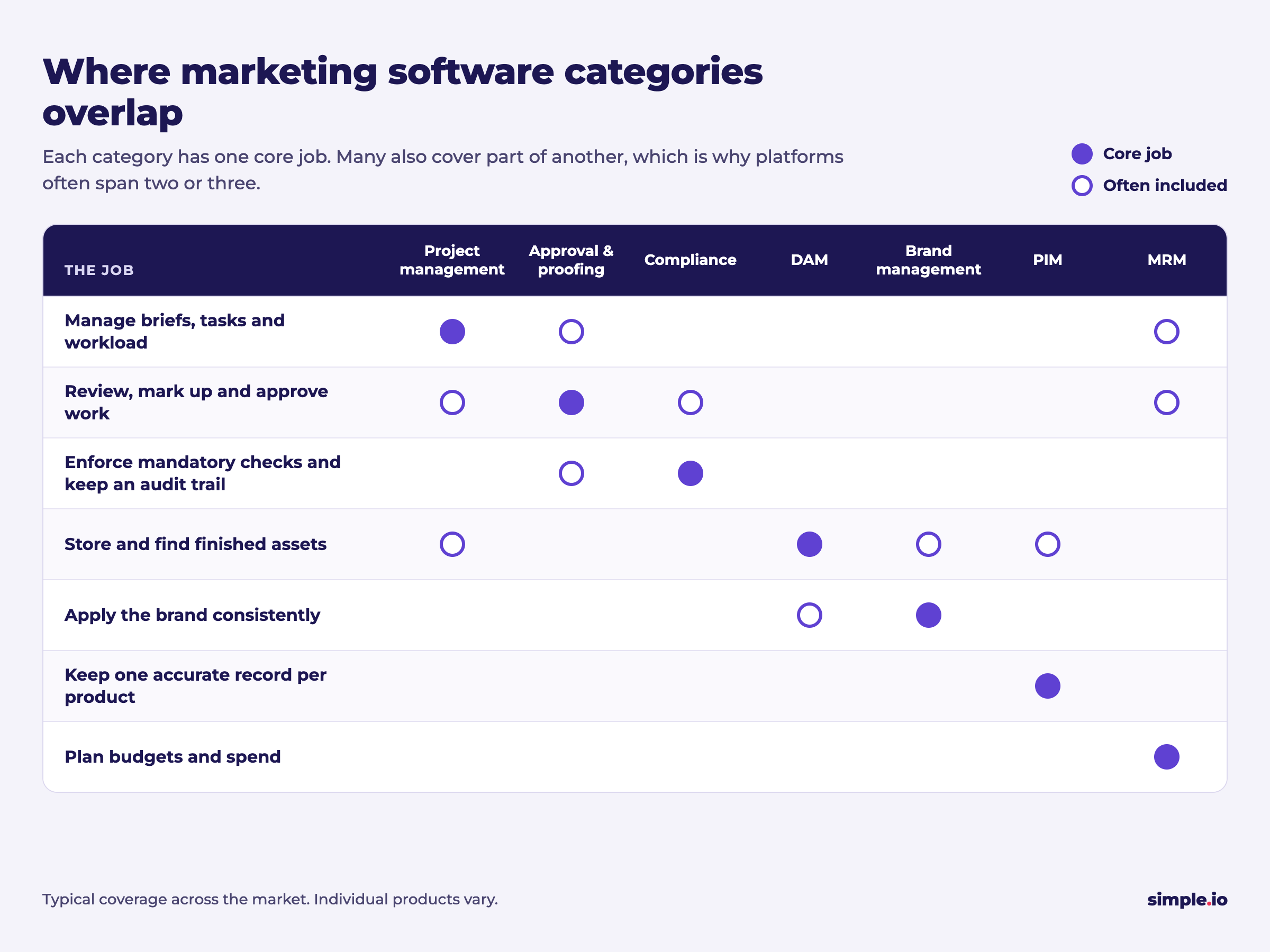
Approval Workflow vs Marketing Project Management
| Marketing project management | Approval workflow | |
|---|---|---|
| What it manages | The work: briefs, tasks, owners, deadlines and workload | The review: stages, markup, versions and sign-off |
| Who uses it daily | Marketing managers, project and traffic managers, designers | Reviewers and approvers, including legal, compliance and stakeholders |
| Where its job ends | When the work is ready for review | When the work is approved for release |
When you need both: once you produce more than a handful of jobs a week and more than one person reviews them. Many platforms combine the two, which avoids handing work between systems at the point it's most likely to stall.
Marketing Compliance vs Approval Workflow
| Approval Workflow | Compliance controls | |
|---|---|---|
| What it manages | Getting content reviewed and approved | Making sure required reviews happen and can be proven |
| Who uses it daily | Everyone who reviews content | Legal, compliance and risk reviewers |
| Where its job ends | At approval | Years later, when an auditor asks who approved what |
When you need both: in any regulated industry. Look for an approval tool that can enforce compliance controls rather than buying a separate compliance product.
DAM vs Brand Management
| Digital Asset Management | Brand Management | |
|---|---|---|
| What it manages | Finished assets and their versions | How the brand is applied: guidelines, templates and rules |
| Who uses it daily | Marketing, design and content teams | Anyone who creates branded material, including non-designers |
| Where its job ends | When the right asset is found and shared | When the material produced is on brand |
When you need both: when many people outside the core team create content. Brand templates then draw on approved assets from the DAM.
DAM vs PIM
| Digital Asset Management | Product Information Management | |
|---|---|---|
| What it manages | Media files: images, video, artwork | Product data: descriptions, specifications, pricing |
| Who uses it daily | Marketing and creative teams | Merchandising, category, e-commerce and supplier teams |
| Where its job ends | When the right file is in use | When every channel shows the same accurate product details |
When you need both: almost always, if you're a retailer or supplier. PIM holds the product record; DAM holds the product imagery. For a fuller comparison, see PIM vs DAM: what's the difference?
MRM vs marketing project management
| Marketing Project Management | Marketing Resource Management | |
|---|---|---|
| What it manages | Work, people and capacity | Plans, budgets and spend across the function, plus work and assets |
| Who uses it daily | Marketing teams and managers | Marketing leadership, finance and planning roles, plus teams |
| Where its job ends | When work is delivered on time | When plans, spend and output are reconciled across the function |
When you need both: in large marketing functions managing budgets across several brands or regions. For most teams, project management plus approval workflow covers the day-to-day need.
How the categories connect
The categories make most sense as stages in one flow of marketing work. Each one hands over to the next:
- Brief and plan (marketing project management): the request is captured, scoped and assigned.
- Produce (marketing project management): the work is created and tracked against deadlines and capacity.
- Review (online proofing): reviewers mark up the work and compare versions.
- Approve (approval workflow and compliance controls): the right people sign off in the right order, with a record kept.
- Store (DAM): the approved final is stored, findable and controlled.
- Reuse (brand management and PIM): approved assets feed brand templates, and product imagery joins the product record.
MRM sits across all of these, connecting the work to plans and budgets. When you assess tools, the handovers between stages matter as much as the stages themselves. Most of the friction in marketing operations happens where work moves from one tool to another.
What to buy first: a typical order by situation
There's no single right order, but common situations follow similar patterns.
| Your situation | Start with | Add next | Common trap |
|---|---|---|---|
| Regulated industry (banking, insurance, health) | Approval workflow with compliance controls | DAM, so only approved assets are reused | Running regulated sign-off through email or a general task tool |
| Busy in-house studio or creative team | Marketing project management with online proofing | DAM | Tracking work and reviews in separate tools that don't connect |
| Many brands, regions, franchisees or agencies | Brand management | DAM, then approval workflow for agency work | Relying on a guidelines PDF and hoping it's followed |
| Retailer or supplier | PIM | DAM for product imagery, then approval workflow for promotional material | Managing product data in spreadsheets or in a DAM's metadata fields |
| Small in-house team | Approval workflow with basic project tracking | A fuller project management and asset setup as volume grows | Buying an enterprise suite before the processes exist to fill it |
| Large function managing budgets across brands | MRM capability, often assembled from project management and approval workflow | DAM and brand management | Expecting one platform to do everything equally well |
Four example teams
These are illustrative profiles, not specific organisations.
A regulated insurer
An eight-person marketing team produces product brochures, emails and social posts, and every piece goes to legal and compliance. Approvals happen by email. When the regulator asks who approved a campaign from last year, it takes days to answer. This team needs approval workflow software with compliance controls first. The trap is choosing a general project tool and recording approvals as comments, which looks fine until the first audit. See how to build audit-ready marketing compliance workflows.
A national retailer
A retail marketing team publishes a weekly catalogue and promotions across stores, website and marketplaces. Product details come from suppliers in spreadsheets, and wrong prices or descriptions reach customers. This team needs PIM with promotion management, plus DAM for product imagery. Getting supplier data right at the start matters too: see why most retailers get vendor onboarding wrong. The trap is trying to manage product data in a DAM, which stores files well but isn't built for structured product records.
A brand team working with several agencies
A central brand team briefs three agencies and supports regional offices that create their own local material. Old logos and off-brand layouts keep appearing. This team needs DAM and brand management, with approval workflow for agency work. The trap is sending out an updated guidelines PDF and assuming the problem is solved. For more on making this work, see managing a hybrid in-house and agency team.
A three-person in-house team
A small team handles requests from across the business by email and chat. Nobody can see what's in progress, and reviews drag on over several rounds. This team needs approval workflow with basic project tracking, and can add a fuller asset library later. The trap is buying an enterprise MRM suite with modules the team will never use. A simple first step is a consistent creative brief, so requests arrive complete.
Questions to ask vendors
Feature lists look similar across vendors. These questions help separate a product built for the job from one that only ticks the box.
Marketing project management
- Can briefs be structured so required information is captured before work starts?
- Can I see each person's workload against their capacity before I assign work?
- Can I compare estimated and actual effort by job, client or team?
Approval workflow and online proofing
- Can different content types follow different approval paths automatically?
- Can reviewers compare versions side by side and see what changed?
- What happens when an approver is on leave? Can the job be reassigned without restarting the review?
Marketing compliance
- Can a compliance stage be made mandatory, so nobody can skip it?
- Does the audit trail record every version, comment and approver, with dates and times?
- How quickly can I produce the approval history for a specific piece of content?
For a fuller checklist, see how to choose marketing compliance software.
Digital asset management
- Can assets be restricted or expired based on usage rights?
- Can approved work move into the DAM from my approval tool without being downloaded and re-uploaded?
- How is metadata applied, and how much of it depends on people tagging files by hand?
For a fuller checklist, see what to look for in DAM software.
Brand management
- Can non-designers create material from templates where only some elements can be edited?
- Can I control which brand elements each group of users can access?
- How are guideline changes communicated to the people who need them?
Product information management
- Can suppliers submit product data directly, and is it checked before it's accepted?
- Can one product record feed every channel, with channel-specific fields where needed?
- How does it handle promotions and price changes across channels?
Marketing resource management
- Does it manage financial spend, or effort and hours only?
- Which capabilities are built in, and which depend on integrations?
- Who configures it for our processes, and what's included in implementation?
Ready to compare specific vendors? See our roundups of the best marketing project management software, approval workflow software, online proofing software, marketing compliance software, DAM software and PIM software for retailers.
Common buying mistakes
- Buying the longest feature list. A platform that does everything adequately can still fail at the one problem that costs you most.
- Buying an MRM suite to fix an approval problem. If work stalls in review, the fix is approval workflow, not a broader platform.
- Using a shared drive or DAM as the approval tool. Folders named "final" and "final v2" are not an approval process, and they don't create an audit trail.
- Running regulated sign-off through a general work-management tool. Comments and status changes are not the same as mandatory review stages and a complete audit trail.
- Buying a DAM before agreeing what "approved" means. Without an approval process feeding it, a DAM fills up with drafts and duplicates.
- Treating PIM and DAM as interchangeable. Product data and media files need different structures. Forcing one into the other creates work later.
How to choose: four steps
- Name the one problem that costs you most. Use the table at the top of this guide. Buy for that problem first.
- Check whether the category you need is a feature of another one. Compliance controls often sit inside approval workflow software, and a lightweight asset library may sit inside a project management tool.
- Decide where you need depth. A lightweight feature inside a broader platform may be enough. If assets, brand or product data are central to your business, a dedicated tool usually pays off.
- Check how the tools connect. Approved work should flow into your asset library, and assets should flow into brand templates or product records, without re-uploading. Fewer, better-connected tools beat a long list of point solutions. For more on this, see how to consolidate your marketing tools.
What this guide doesn't cover
This guide focuses on marketing operations: the software that manages how marketing work is planned, produced, reviewed, stored and governed. It doesn't cover customer-facing tools such as marketing automation, email marketing, CRM, social media management or website content management. Those manage how you reach customers, not how your team produces the work.
Where Simple Marketing Solutions fits
Simple Marketing Solutions (simple.io) is an Australian software company with four standalone products that cover six of the seven categories above.
- Simple Admation is a marketing approval workflow, online proofing and marketing project management platform with built-in compliance controls, including mandatory review stages and a complete audit trail. It includes an Asset Library for storing approved work. Simple Admation manages effort and capacity (budgeted vs actual hours); it does not manage financial spend.
- Simple Asset Manager is a digital asset management (DAM) platform for storing, searching, controlling and sharing approved marketing assets.
- Simple Brand Manager is brand management software for keeping brand guidelines, templates and approved brand elements in one place.
- Simple RetailPath is retail product information management (PIM) and promotion management software for retailers and their suppliers.
Each product works on its own, and they can be used together. Simple Admation is used by marketing teams at organisations including Bupa, HESTA and RACV. See our customers.
Frequently asked questions
What are the main types of marketing operations software?
The seven main types are marketing project management, approval workflow and online proofing, marketing compliance, digital asset management (DAM), brand management, product information management (PIM) and marketing resource management (MRM). Each solves a different problem, from tracking workload to controlling product data, and many platforms combine two or three of them.
What is the difference between approval workflow software and marketing project management software?
Marketing project management software tracks the work itself: briefs, tasks, owners, deadlines and workload. Approval workflow software manages the review of that work, routing content through set stages with online markup and version comparison. Many platforms, including Simple Admation, combine both because most teams need visibility of the work and control of the review.
Is marketing compliance software separate from approval workflow software?
Usually not. Marketing compliance is most often a set of controls inside approval workflow software: mandatory review stages, reviewer checklists, approved wording and a complete audit trail. If your approval tool can enforce those controls, you may not need a separate compliance product. Regulated industries such as banking, insurance and health rely on them most.
What is the difference between DAM and brand management software?
Digital asset management (DAM) software stores and controls finished assets such as images, video and logos, so people can find the current version. Brand management software governs how the brand is applied, through guidelines, templates and approved brand elements. Organisations with many content creators often use both, with templates drawing on assets from the DAM.
What should I ask a vendor before buying marketing operations software?
Ask questions that test the job, not the feature list. For approval workflow, ask whether a compliance stage can be made mandatory and whether the audit trail records every version and approver. For DAM, ask whether approved work flows in without re-uploading. For any category, ask what implementation includes and who configures the product for your processes.
What marketing software should a small marketing team buy first?
Most small in-house teams get the most value from approval workflow software with basic project tracking, because slow reviews and lost requests are usually their biggest costs. An asset library can follow as volume grows. Enterprise MRM suites are rarely the right first purchase for a small team, because much of their capability goes unused.
Which marketing software categories does Simple Marketing Solutions cover?
Simple Marketing Solutions (simple.io) covers six categories with four standalone products. Simple Admation covers marketing project management, approval workflow, online proofing and compliance controls. Simple Asset Manager is a DAM, Simple Brand Manager covers brand management, and Simple RetailPath covers retail PIM and promotion management. The products work alone or together.
Not sure which category fits your team?
Watch a demo or book a demo and we'll help you work out where to start.


